HubSpot CMS-certified development team

Work With Our HubSpot Developers

Johanna Azis Brendon Loscar Vishnu Potini

Trusted by 270+ customers, from startups to enterprises

Frame 57

Trusted by High-Growth Teams to Scale Their HubSpot Operations

See Our Work
Quote Icon

Effective and Responsive! HubBase worked to understand our goals and designed/developed/tested the website and launched the initial phase in 5 weeks! They are organized and incredibly responsive - most questions and feedback is addressed within 24 hours.

Nick Gustafson

Senior Marketing Manager Livtech

Quote Icon

We LOVE you guys. We throw such hard problems at them and they masterfully solve them for us.

Lisa Tennyson

Director, Campaign Marketing EP Wealth

Quote Icon

The HubBase team is an absolutely delightful partner to work with. I've had the pleasure of working with them on several website development requests now, and each time they've been able to deliver exactly what we've asked for, and have done so quickly. 

L'erin Jensen

Content Manager Pontera

Quote Icon

The Hubbase team is absolutely wonderful! They got our vision without much back and forth and are extremely responsive in helping in any way they can! I can’t wait to continue to work with them :)

Bridget Cooley

Marketing Specialist LookingPoint

Quote Icon

The HubBase team have been extremely helpful in a variety of website projects including the transition to HubSpot Themes and fixing critical core web vital issues. They are knowledgeable and fast acting - a great team who are highly supportive and act as an extension of our own team!

Johanna Azis

Head of US Marketing Quantilope

Quote Icon

Terrific to work with. They were extremely professional, fast, and responsive. They went above and beyond to work on a short timeline and even spent the weekend to ensure the work was completed in a timely manner. I'd highly recommend the team.

Chris Alto

Founding Member Vendr

Quote Icon

HubBase takes a holistic and methodical approach to SEO and understands the role that time and quality of content play in building a strong, consistent brand. They respond to issues quickly and clearly communicate their work, process, and projects.”

Amy Levine

Director of Content Marketing Virsec

Optimizing for Humans & AI Engines

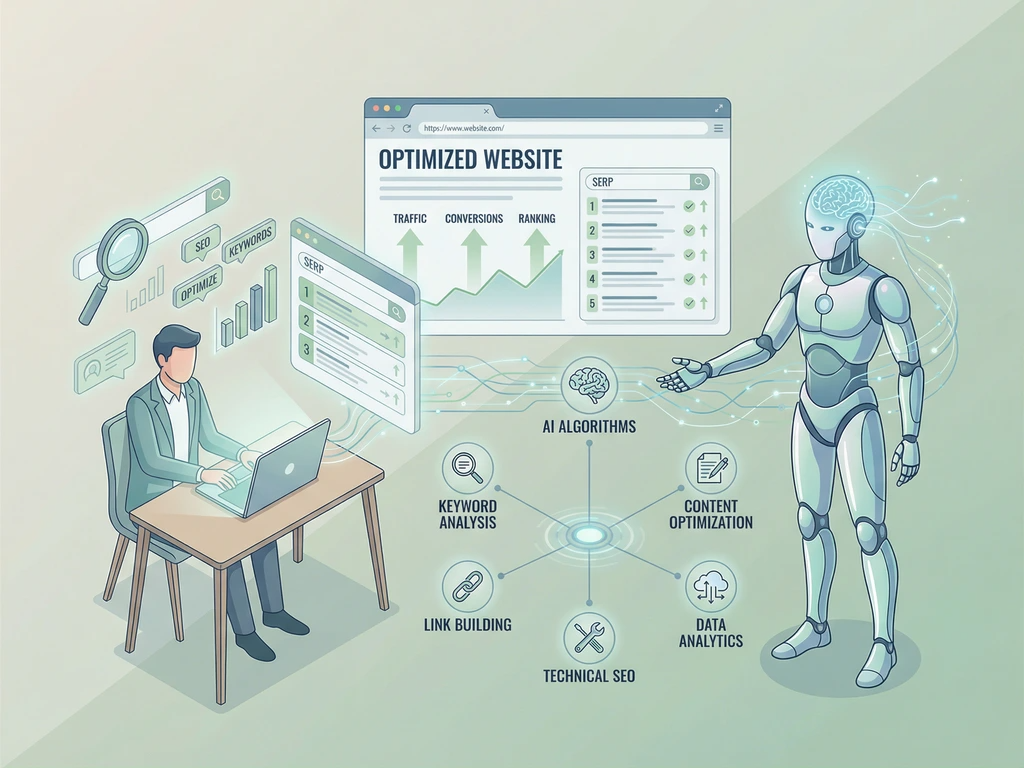
We don't just build for Google anymore. Our HubSpot developers optimize for SearchGPT, Perplexity, ChatGPT, and emerging AI answer engines. Your website becomes not just searchable, but a trusted source for AI-powered answers. From website loading speed to structured data, from responsiveness to meta tags we architect every line of code with both human users and AI crawlers in mind.

Explore AEO Strategy
Human and AI collaborating to search optimize a website with SEO tools, keyword analysis, and ranking metrics.

Military-Grade Security Architecture

We focus on defensive coding, ensuring developers never introduce vulnerabilities. Every function is hardened. Every input is validated. Every output is sanitized.

Post-development, we shift to offensive security. Our certified ethical hackers perform comprehensive pentesting to eliminate data validation flaws, injection vulnerabilities, and authentication weaknesses before they become liabilities.

Get Security Audit
McAfee logo
OWASP logo
CEH

Real-Time Collaboration, Zero Friction

Share your HubSpot development vision and get a transparent quote within 48 hours. We pride ourselves on radical transparency. Once we kick off, you're not just a client—you're part of our team.

We stay in constant communication via Slack, Trello, and Google Meet. Daily standups. Weekly demos. Real-time feedback loops. Your success is our sprint goal.

Start Your Project

Our Developers Push HubSpot Boundaries

Solving complex business problems with technical precision. We build high-performance, complex systems that standard implementations can't reach.

01
Technical Mastery

API Integrations

Add advanced functionality to HubSpot. Pull and push data from any app or platform with custom API integrations. Connect your entire tech stack seamlessly and unlock new possibilities for your business operations.

Build your Solution
Popular Integrations
02
Data Engineering

Custom Objects

Don't limit yourself to the native list of HubSpot CRM objects. Add any custom object that matters to your business. Build a data model that reflects your unique business logic and processes.

03
Ecosystem Connectivity

HubSpot Apps

Build custom functionality between HubSpot and your eCommerce, inventory, accounting, or any other system. Create powerful integrations that extend HubSpot's capabilities across your entire business ecosystem.

04
Interface Optimization

CRM Extensions

Embed, access and edit external data directly in a contact, company, or deal record with HubSpot CRM Extensions. Enhance your CRM interface with contextual information.

05
Programmable Logic

Custom Workflows

Trigger a custom workflow action based on a custom HubSpot integration, object, or app. Automate complex business processes with precision and control.

HubSpot Platinum Solutions Partner badge on orange ID card with lanyard showing certified partner program credential
Certification icon CERTIFICATIONS

HubSpot Platinum Partner

We have been in the business long enough to understand the nuances of business.

Check
Platinum Certified agency
Check
200+ Integrations built
Check
Workflows customized for your business
Check
4.9/5 Average rating on google
Book a Consultation
Client Management
Client Management
certified
CMS Development certification badge with code brackets and gear icon representing content management development skills
CMS Developers II
certified
HubSpot CMS Implementation badge logo showing gears and certification seal for content management system expertise
CMS Implementation
certified
Inbound methodology approach for business growth showing customer-centric marketing and sales alignment
Inbound
certified
Academy SEO online learning platform showing certification courses and professional training programs
Academy SEO
certified
Inbound marketing methodology diagram showing attract, engage, and delight stages for customer acquisition
Inbound Marketing
certified
HubSpot and Salesforce integration showing CRM connection and data synchronization between platforms
Salesforce Integration
certified
HubSpot Sales Software certification badge showing sales management and CRM platform expertise
Sales Hub Software
certified
CMS Development badge logo showing technical implementation and coding expertise for content management systems
CMS Developers I
certified
HubSpot Marketing Hub Software certification badge representing marketing automation and campaign management expertise
Marketing Software
certified
HubSpot Sales Software certification badge showing sales management and CRM platform expertise
Sales Software
certified
HubSpot dashboard interface showing analytics, reporting metrics, and platform overview for business intelligence
Platform Consulting
certified
HubSpot Reporting certification badge with analytics chart icon showing data reporting and insights expertise
Reporting
certified
HubSpot Implementation for Partners certification badge showing partner program expertise and implementation skills
Implementation Partners
certified
HubSpot Objective-Based Onboarding certification badge representing customer success and onboarding expertise
Objective Onboarding
certified
HubSpot Data Integration certification badge with database icon representing data management and integration expertise
Data Integration
certified
Vendr logo
Quantilope logo
Semrush logo
GOSS RV Logo
RaiseRight Logo
HubSearch Logo Dark
Wellhub Logo
Virsec Logo
LivTech Logo
Logichub Logo
BL.INK Logo
Profile Plan Logo
IBM Logo
lookingpoint-23
ursahealth-23
Pontera

Trusted by 270+ customers, from startups to enterprises

Schedule a call

Book Your Free Consultation


HubSpot Developers FAQs

Have your HubSpot web development project requirements and budget ready? Here are the resources to find a HubSpot developer that fits your needs:

  • HubBase HubSpot certified developers
    Our experienced HubSpot developer team laser focuses on building websites in HubSpot CMS. We also focus on HubSpot CMS integration with other business platforms. Set up a free 30-minute consultation call and get free recommendations based on your specific project needs. Our team will recommend best practices and help with execution to ensure you are able to achieve your business goals by leveraging the latest tech stack alongside HubSpot CMS.
  • Search HubSpot developers on LinkedIn
    Looking for an in-house resource? HubBase HubSpot developers work as an extension of your team. We create a join Slack channel and use a shared trello board for project management. This allows our clients to monitor progress in real-time and stay in constant communication with us. Alternatively, explore LinkedIn’s search engine or recruiter mode to find a qualified HubSpot developer.
  • Talent marketplaces like Upwork or Fiverr
    Explore the talent pool of gig marketplaces like Upwork, Fiverr, MarketerHire, etc. You can filter HubSpot developers based by your budget, reviews, level of expertise, country, and availability. These platforms allow you to post your project details and the talent either applies if they are interested, or you can invite them to work on your project.
  • Generalist HubSpot agencies
    Explore this list of agencies that may offer HubSpot CMS services alongside other solutions. Based on country, service expertise, and industry, you can pick and choose what works best for your business.

If your web developers want to play and experiment with HubSpot CMS, creating a HubSpot developer account is free. Set up a HubSpot Sandbox account where you can build custom apps, integrations, or websites. You can get support from the very active HubSpot community forum. A dedicated HubSpot Academy portal is available to help anyone get started with using HubSpot’s platform and its APIs. It is full of incredible courses, and we always recommend to our clients to leverage this great resource. Additionally, HubSpot offers workshops and an ample amount of videos, articles, courses, and other educational materials to get creators familiar with HubSpot platform. 

Among other hubs (the latter is how HubSpot refers to its multiple products – notice the name!), HubSpot CMS is one of the products offered by HubSpot. The flexible content management platform adapts to your business and is designed to help you scale.

HubSpot CMS cost varies based on the plan you choose. But regardless of the CMS plan, qualified startups can benefit from a huge 90% discount. Take a look to see if your company qualifies.

In the CMS, you can build landing pages, blogs, apps, and applications. HubSpot’s simple drag-and-drop editor allows creators and marketing teams to manage and update the website once it’s built by a HubSpot developer.

HubSpot CMS also offers various native integrations with industry-leading platforms to help you develop powerful applications and adapt to your business workflows. You can expand and customize your website’s functionality via the robust API and build custom HubSpot integrations.

HubSpot CMS was voted as the #1 web content management system by G2.

HubSpot Content Hub is a comprehensive platform that merges content management with marketing tools. It facilitates streamlined content creation, organization, and analytics, making it easier to manage and scale your content strategy. This hub enhances workflows and integrates smoothly with other marketing tools. Your HubSpot developer should be well-versed in this tool. 

HubSpot Content Hub includes advanced features beyond those in HubSpot CMS. While CMS Hub focuses on managing website content, Content Hub offers improved content organization, enhanced workflows, and better marketing tool integration, making it ideal for comprehensive content marketing efforts. 

Java is the programming language used by HubSpot for building reliable, fast and secure web applications. HubSpot CMS uses HubL or HubSpot Markup Language, which is an extension of Jinjava (a Jinja-based templating engine). It’s unique to HubSpot’s ecosystem and includes the usual features such as For Loops, variables, IF statements, macros, functions, etc. Note that some Jinja features are not supported.

Applications built with HubL are scalable and can be quickly tested and released. The wide availability of talented Java developers and ease of collaboration made Java an easy choice for HubSpot to adopt the programming language. HubSpot’s data stores are also written in Java. The team creates a single set of high-quality components, libraries, abstractions, and frameworks, thus enabling faster development and releases. For providing dynamic capabilities across its platform, HubSpot uses JavaScript as its coding language of choice.

HubSpot CMS templates and modules are constructed of HubL, HTML5, CSS, and JSS, JQuery. It also uses a drag-and-drop editor which is designed in what you see is what you get (WYSIWYG) format. All the media files like PDFs, images, and videos get stored in the web-application-based file manager.

You can extend HubSpot’s features with its API, integrations, and app marketplace to build features that are beyond HubL’s capabilities.

Learn what separates HubSpot developers from other coders.

Ok, the obvious answer aside, let's dive in a bit deeper into details:HubSpot developer is ideally a certified HubSpot professional who skilled in creating applications, use of APIs, is able to build custom integrations, and build websites using the latest tools offered by HubSpot. This includes creating landing pages, setting up CRM, designing blogs, optimizing for SEO, and building custom apps.

Our HubSpot developers start with a free consultation to understand your business requirements and create a plan to best leverage HubSpot in combination with other platforms to achieve the desired website functionality. By layering full-stack development on top of HubSpot CMS, our team can build anything, no matter how complex your functionality requirements are.

Other typical HubSpot development projects include:

Both HubSpot and SalesForce offer powerful tools and solutions for marketing and sales, such as Customer Relationship Management (CRM), integrations, app marketplaces, and CMS. Both also have unique business use cases and differentiating features in their ecosystems that compete head-to-head. Make a decision on which platform to use based on your budget, time availability, and features required to solve the business problem.

Although Salesforce does offer a CMS solution, HubSpot CMS offers more advanced features and drag-and-drop functionality that allows creators to manage websites with ease.

Additionally, HubSpot offers more affordable options. In fact, the entire vision of the company was created to offer powerful business tools, previously only available to established companies with large budgets. HubSpot’s mission was to make enterprise-level tools accessible to startups and companies with smaller budgets.

HubSpot provides access to API integrations that allow developers to build powerful and custom business solutions. HubSpot API is free and offers 40,000 calls per day for free. Developers can find HubSpot API in the Settings option under the Integrations menu.

The HubSpot API uses regular call features like GET, POST, DELETE, PUT, and error response. You can design custom workflows and trigger events across external applications. HubSpot offers extensive documentation, reference, and integration guides to help developers get familiar with the API ecosystem.

HubSpot provides native integration with Salesforce. This integration allows managing teams, workflows, and campaigns across marketing, sales, social media, CRM, services, and operations. For example, you can share the insights captured by HubSpot and feed them to Salesforce for using its advanced features for analysis.

To make this integration work, you need a Salesforce Professional account for their API access. Also, you can connect only one HubSpot account with one Salesforce instance.

A single contact sync can take up to four API calls per record, but this number varies depending on the API call limit. You can sync contacts, tasks, properties defined, activities, etc. It is advised to hire a professional HubSpot developer who can help you with the HubSpot-Salesforce integration.

HubSpot provides a safe and dedicated Sandbox that you can use to experiment and iterate with your website design in the HubSpot CMS.

HubSpot’s Sandbox also allows you to test integrations that it supports. You can check how the data flows in your designed workflow and fix any loopholes. Test templates, modules, dynamic elements, etc., before making it live to your customers for a seamless user experience. HubSpot has also provided a Sandbox Academy Course to help you use their test environment.

Using HubSpot Sandbox does not affect your main account or the production environment. You can quickly test integrations, design websites, and optimize workflows to experiment with HubSpot’s features. The HubSpot Sandbox also allows you to sync data from the main account to test your application in a real-scenario-like simulation environment.

Using a staging environment reduces the element of risk that comes with editing websites live. Our developers follow design mockups and transform Figma (or Photoshop XD, for example) mockups into the HubSpot CMS staging environment first. Then from the staging site, you can quickly review website content and see if the page is ready to be published live, or if any additional page updates are required.

The HubSpot standard sandbox account is available for all Enterprise customers across Marketing, Sales, Services, Operations, or CMS hubs. In addition, standard sandbox accounts are separate from app developer accounts (which are used to develop HubSpot integrations and apps).

Familiarity with the HubSpot CMS technology stack, including protocols and website optimization techniques. Also, you should have a solid understanding of HubSpot's local development. Knowledge of serverless technologies is a huge plus!

On top of that, you must have great communication skills. We’re a very close and passionate team. We believe that open and ongoing communication is the only way to provide the best services to our clients.

A strong understanding of security and performance fundamentals is essential. We write secure code. UI/UX best practices are essential as well. We work with mockups and HubSpot marketplace themes. The ability to transform design mockups to HubSpot CMS in a pixel-perfect manner is a must.

You must be a self-starter with excellent project management skills. Ability to work independently and QA your work meticulously.

We recently published a HubSpot Theme on the marketplace, and we’re planning to develop more. This could be one of your first projects!

So if you got at least 2+ years of HubSpot development experience--send us a note! Please include examples of your work, as well as a description of your approach to technical project management. We’re looking forward to hearing from you: hello@hubbase.io.

Our Approach: we wrote an article on how to hire a HubSpot Developer. This article contains a lot of insights into how we approach CMS development and our philosophy on coding in general--so check it out before you drop us a note!

HubSpot developer tools allow are designed for CRM with UI extensions customization. Developer tools include development sandboxes, version control, and GitHub integration. 

Here are the general steps that our team follows:

1. Deep Dive Into the Project Brief
We review the project brief to fully understand the development requirements including objectives, scope, timeline, and deliverables.

2. Strategic Planning & Roadmap Development
Once the project specifications are clear, our HubSpot developers move to the planning stage. Here, we produce detailed roadmap that maps out major milestone of the project. From design and development phases to testing and go-live.

3. Design Prototyping & Wireframing
If the client requires design services, we create interactive design prototypes and wireframes. This visual blueprint is used as guide, showcasing the functional and aesthetic elements of the future website.

4. Coding & Development
Our developers dive into CMS Hub and create fast-loading HubSpot websites that are easy to maintain and scale. This stage involves heavy lifting, from developing responsive layouts to integrating functionalities, ensuring a seamless user experience across all devices.

5. Testing & Quality Assurance
Quality assurance is integral in our HubSpot development project cycle. Rigorous testing is conducted to check functionalities, user experience, load time, and compatibility across various devices and browsers.

6. Launch & Post-Launch Support
Post-client approval, we take the website life. Our HubSpot developers provide post-launch support, ensuring your website runs smoothly and any potential issues are addressed.

7. Training & Handover
Once the website is launched, a training session is conducted to equip your team with the necessary skills to manage your new site. Our team ensures you have total control over your website.

Understanding the distinction between a HubSpot Developer and a HubSpot Designer is key for businesses aiming to enhance their online presence through the HubSpot platform. A HubSpot Developer focuses on the technical side, implementing and customizing the website's functionality, ensuring seamless integration with other systems, and optimizing for performance within the HubSpot CMS. Their expertise is crucial for custom development work that extends beyond out-of-the-box features, including API integrations and creating custom modules.

On the other hand, a HubSpot Designer concentrates on the website's visual aspects, user experience (UX), and interface design. They ensure the site is not only visually appealing but also intuitive for users, adhering to brand guidelines and optimizing for mobile responsiveness. The designer's role is pivotal in making sure the website communicates the brand's message effectively and provides a seamless experience for visitors. Both roles are essential; while designers lay the groundwork for a site's look and feel, developers bring this vision to life, ensuring it functions flawlessly on the HubSpot platform.Check out full Web Developer vs Web Designer FAQs.